Join the 250 organizations that manage their quality with Agilium. Our experts based in Grenoble will guide you every step of the way—no offshore staff, no surprises.
Everything is in separate tools that don't communicate with each other
Schedules in Excel, reports in Word, tasks in a third file: you’re wasting time trying to sync everything manually.
01
Audit findings do not automatically become actions
You don’t have any grids that meet your specific criteria
02
You don't have any grids that meet your specific criteria
The standard ISO templates don’t match what you’re actually auditing, and adapting them each time is tedious.
03
It is impossible to know whether the issues from previous audits have been resolved
Before each new audit, you don’t have an overview of what has remained open since the last one.
04
Why
You conduct audits. But your findings rarely lead to concrete actions.
Your internal audits rely on three tools that don’t communicate with each other: an Excel spreadsheet for scheduling, a Word document for the report, and yet another tool for tracking the resulting actions. Preparing an audit means retrieving last year’s checklists, adapting them manually, and emailing them to the auditor.
After the audit, you re-enter the findings into your tracking tool. And when the next audit comes around, you have no way of knowing whether the issues from the previous year have been addressed.
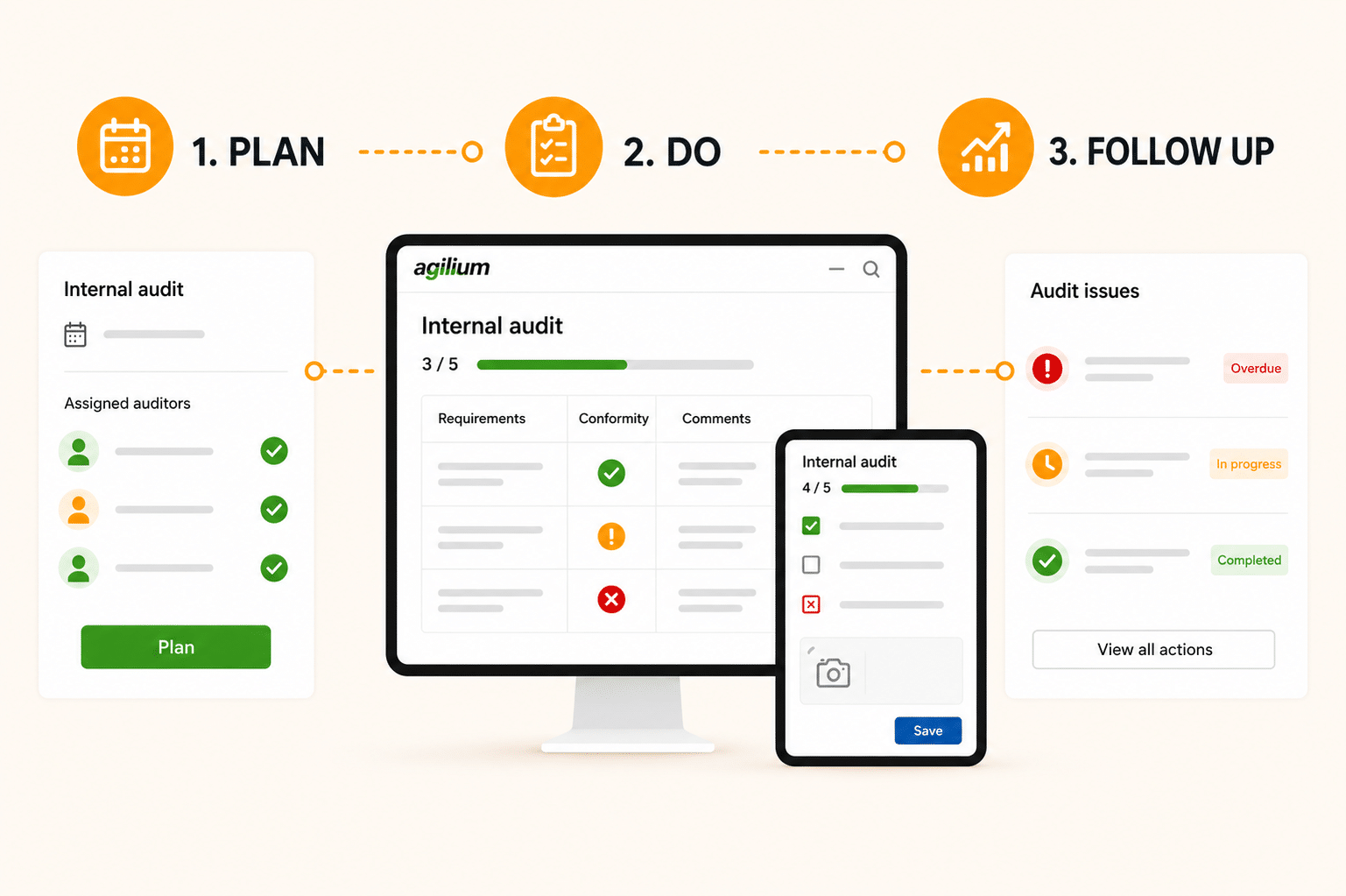
From planning to completion, every audit is prepared, conducted, and tracked in Agilium—findings are automatically converted into corrective actions, with no need for re-entry.
An audit planned, conducted, and followed up on without ever changing tools
Plan your audits, assign auditors, complete the checklists on a desktop or tablet, and track the resulting actions. All in one place, with no need for manual synchronization.
Checklists tailored to what you're actually auditing
Create your own checklists or use ISO standards as a starting point. You can add your own criteria, checkpoints, and attachments. You don’t have to start from scratch with last year’s checklist.
From Identification to Corrective Action, Without Re-entry
Every issue raised during the audit is automatically flagged as a nonconformity and triggers an action plan. Before the next audit, you’ll know exactly what has been addressed and what remains open.
Agilium centralizes and organizes your ISO compliance
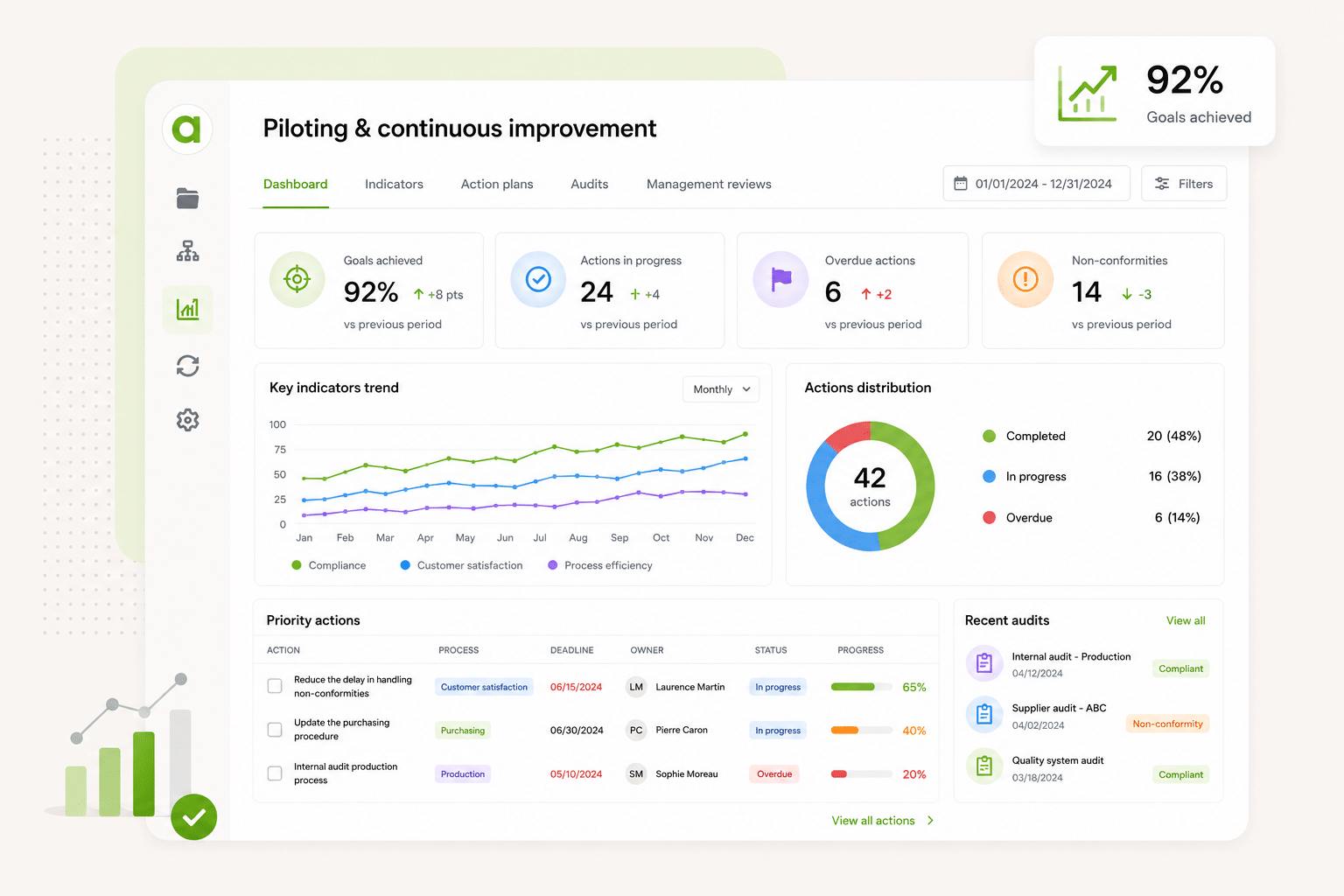
Agilium’s continuous improvement module centralizes audits, nonconformities, action plans, metrics, and management reviews in a single tool with automated workflows, ready-to-use ISO templates, and real-time monitoring of your QMS
Agilium enabled us to build and digitize our quality system and obtain our ISO 9001 certification in less than a year. The solution is particularly well-suited for small industrial businesses thanks to its ease of use and comprehensive coverage of quality processes. We now manage our audits, risks, nonconformities, action plans, and documents from a single platform. Our teams quickly adopted the tool, and we now have a clear and structured view of our QMS. It’s a real asset in supporting our growth.
Thierry Casanova
Quality Manager
Premium Energy
Energy-Efficient Renovation
The activity history with export and filter options is really handy. I give monthly presentations to my management team on what’s going on, and this lets me put together a report in two minutes: I filter what I want to show, export it, and I’m done. The favorite documents for my teams, the FAQ right in the tool… these are the little things that really make a difference every day. Generally speaking, people find their way around it. We set up the folders together, so they’re pretty comfortable with it. And what we’ve always appreciated about Agilium is how responsive they are: when I have a question, I get a clear answer within half a day. For an SME like ours, that’s really helpful.
Justine SAINT MARTIN
Quality and QSE Manager
UPEC
Higher Education
Agilium is, overall, a fairly practical solution that allows us to work flexibly on our problems and challenges. We see the solution evolving over time. In addition, follow-up by our contacts at the service provider is smooth and consistent, which is a major plus. We appreciate the ability to work on action plans, audits, and processes. We also appreciate the flexibility offered in terms of the software interface layout.
Alexandre Leroy
Internal and Organizational Auditor
Losange
Manufacturers
EDM at Its Best: User-friendly system, layout, tracking of reading information…
Frédéric Rivet
QMS Manager
Lustucru Frais
Food production
We had a great experience with a sales representative who was very attentive to our needs. The email-based workflow system with read receipts is excellent.
Aline FAVIER
Quality Engineer
Medissimo
App for Pharmacists
So far, the setup is going very smoothly, and the configuration is very simple. The main advantages we see are its ease of use and configuration.
Emmanuel Leclerc
Director of Internal Operations & Quality Manager
Frequently Asked Questions
Everything You Want to Know About Agilium
A platform designed to centralize your operations, automate your processes, and engage your teams in a more streamlined quality initiative.
Can I send an invitation to the auditors and the auditees?
Yes, once the preparatory documents are available, the auditees can then accept the invitation in their calendars. The auditors, for their part, receive an email and a task in the app inviting them to conduct the audit.
AUDIT, NONCONFORMITY
Do you have an overview of the audit schedule?
Yes, a scheduling view is available in the form of a monthly calendar, with various filters and color-coding that makes it easy to distinguish between the different types of audits.
AUDIT, NONCONFORMITY
Is the audit module limited to managing quality audits?
No, you can also use it to perform inspections or follow-ups by creating a custom checklist. For example, to conduct a weekly machine inspection, you create your checklist, set it to repeat weekly, and you’re all set!
AUDIT, NONCONFORMITY
What types of audits can I manage with Agilium?
Any type of audit, including internal audits (whether outsourced or not), audits conducted by external firms, and client audits.
AUDIT, NONCONFORMITY
How does Agilium manage audit planning and tracking?
Agilium SMQ enables the planning and tracking of internal and external audits, with filters by audit type, manager, or standard. It also allows for the creation and modification of evaluation checklists in real time, the automatic generation of audit reports, and the tracking of nonconformities identified during audits.
AUDIT, NONCONFORMITY
Ready to transform your quality approach ?
Join the 250 organizations that manage their quality with Agilium. Our experts based in Grenoble will guide you every step of the way—with no offshore staff and no surprises.