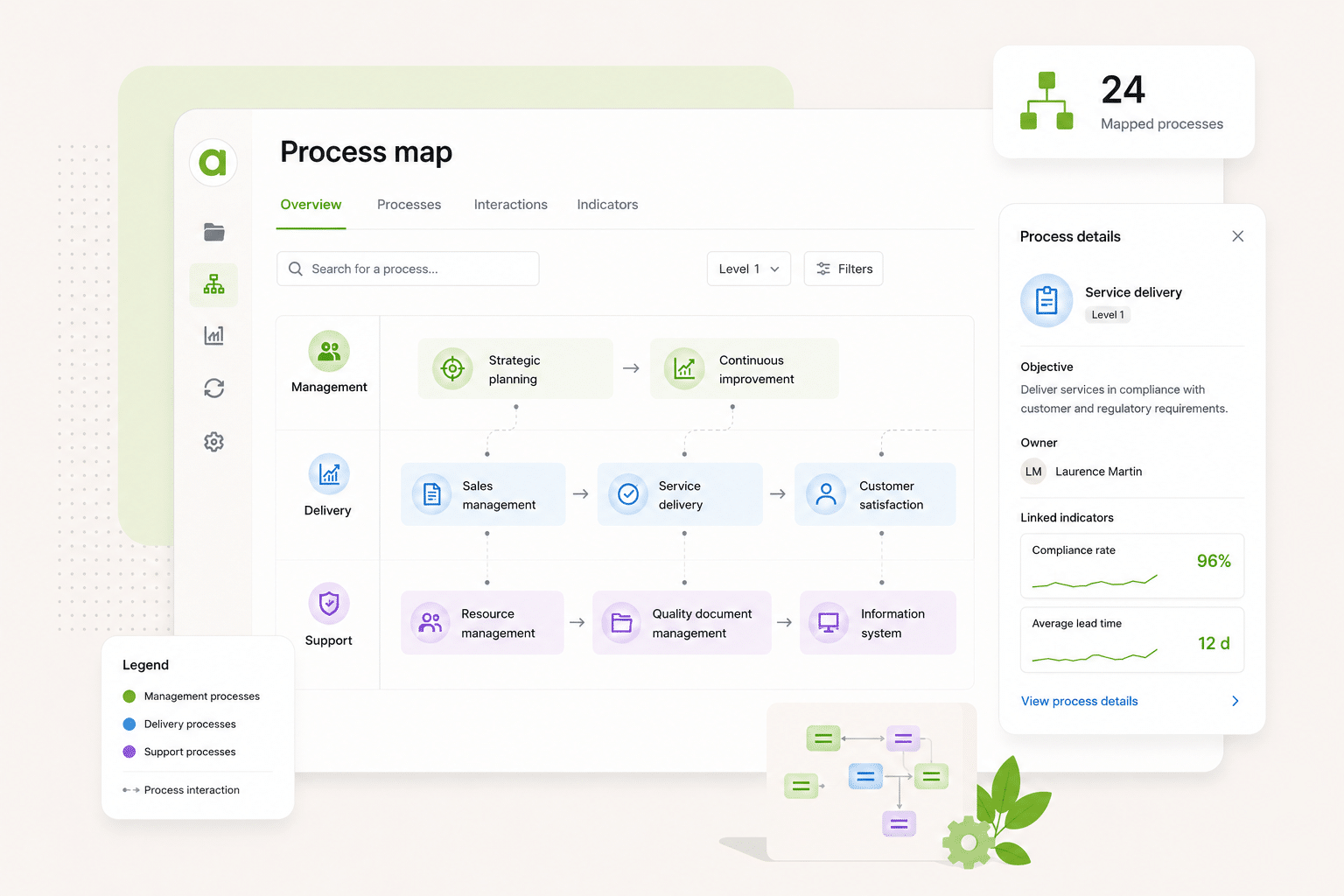
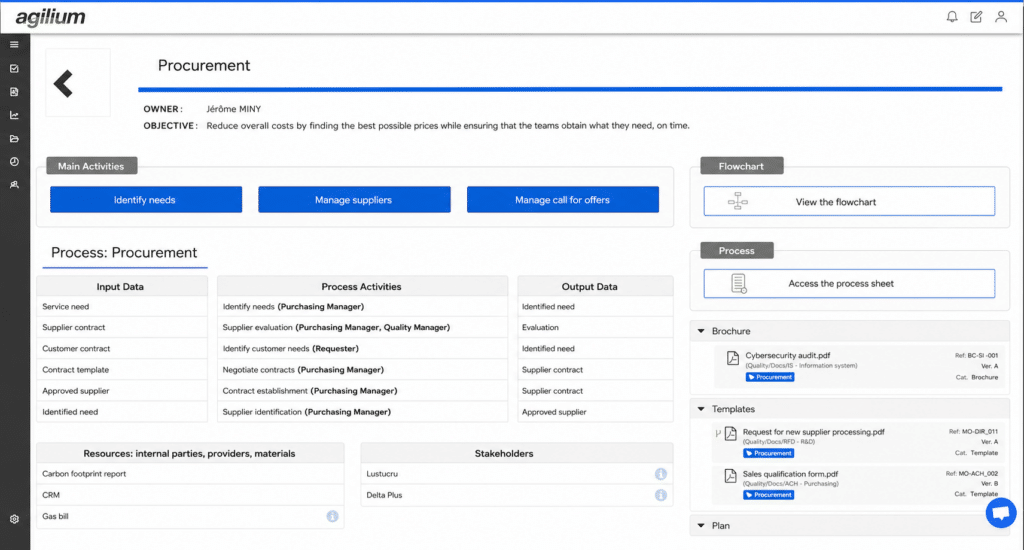
Your processes remain connected, up to date, and in use by your teams not just archived for audit purposes.
Simple modeling with ready-to-use templates
Links to documents, indicators, NCs, risks, etc.
Easy-to-access and well-organized processes
Testimonial
“At UPEC, we’ve used Agilium’s process mapping at several levels: at the institutional level, the unit level, and the business domain level. This flexibility allows us to help everyone understand their place within their environment—whether in central services, academic units, or laboratories—and to more easily access the processes that are relevant to them.”
Sylvie Matecki, known as Materklas
Quality Coordinator at UPEC
WHAT IS IT FOR?
Process Diagram Module Features
A comprehensive module for modeling, structuring, and bringing your quality processes to life.
Agilium enabled us to build and digitize our quality system and obtain our ISO 9001 certification in less than a year. The solution is particularly well-suited for small industrial businesses thanks to its ease of use and comprehensive coverage of quality processes. We now manage our audits, risks, nonconformities, action plans, and documents from a single platform. Our teams quickly adopted the tool, and we now have a clear and structured view of our QMS. It’s a real asset in supporting our growth.
Thierry Casanova
Quality Manager
Premium Energy
Energy-Efficient Renovation
The activity history with export and filter options is really handy. I give monthly presentations to my management team on what’s going on, and this lets me put together a report in two minutes: I filter what I want to show, export it, and I’m done. The favorite documents for my teams, the FAQ right in the tool… these are the little things that really make a difference every day. Generally speaking, people find their way around it. We set up the folders together, so they’re pretty comfortable with it. And what we’ve always appreciated about Agilium is how responsive they are: when I have a question, I get a clear answer within half a day. For an SME like ours, that’s really helpful.
Justine SAINT MARTIN
Quality and QSE Manager
UPEC
Higher Education
Agilium is, overall, a fairly practical solution that allows us to work flexibly on our problems and challenges. We see the solution evolving over time. In addition, follow-up by our contacts at the service provider is smooth and consistent, which is a major plus. We appreciate the ability to work on action plans, audits, and processes. We also appreciate the flexibility offered in terms of the software interface layout.
Alexandre Leroy
Internal and Organizational Auditor
Losange
Manufacturers
EDM at Its Best: User-friendly system, layout, tracking of reading information…
Frédéric Rivet
QMS Manager
Lustucru Frais
Food production
We had a great experience with a sales representative who was very attentive to our needs. The email-based workflow system with read receipts is excellent.
Aline FAVIER
Quality Engineer
Medissimo
App for Pharmacists
So far, the setup is going very smoothly, and the configuration is very simple. The main advantages we see are its ease of use and configuration.
Emmanuel Leclerc
Director of Internal Operations & Quality Manager
Services
Training / Configuration
Our teams will assist you in modeling your initial processes and training your users, ensuring a quick and seamless transition tailored to your organization.
Can each process operator update their own record, or does the quality manager handle everything?
Both. Agilium allows you to assign a user to a specific scope and grant them permissions to publish or edit the documents and information that pertain to them. You retain overall oversight and approve changes. This configuration is set up during implementation, depending on how you want to assign access rights.
PROCESS MAPPING
From the map view, can we access the documents, nonconformities, and action plans associated with a process with a single click?
Yes. From the map, clicking on a process opens a 360-degree view of everything related to it: documents, metrics, audits, nonconformities, action plans, and risks. Everything that has been tagged to that process is automatically displayed. There’s no need to switch between different modules.
PROCESS MAPPING
Can we model these processes as flowcharts, showing the steps, the people responsible, and the associated data?
Each process sheet contains a flowchart tab, an input and output data tab, and the associated stakeholders. The flowchart is a file that you can create in Agilium using a dedicated module.
PROCESS MAPPING
Does Agilium allow you to conduct process reviews directly within the tool, with metrics, audits, and risks all in one place?
Yes. Agilium has a dedicated review module—management reviews and process reviews. You define the time period, the agenda, and the participants. The tool automatically retrieves all data for that period: nonconformities, corrective actions, audits, and metrics. You don’t have to re-enter anything or compile any data.
PROCESS MAPPING
Do we need to have a finalized map to get started, or can we build it and refine it within the tool as we go?
Yes, the “Documents,” “NC,” “Actions,” and “Audits” tabs are visible in the process record.
PROCESS MAPPING
From the map, is there direct access to documents, NCs, and action plans?
Yes, the “Documents,” “NC,” “Actions,” and “Audits” tabs are visible in the process record.
PROCESS MAPPING
Ready to transform your quality approach ?
Join the 250 organizations that manage their quality with Agilium. Our experts based in Grenoble will guide you every step of the way—with no offshore staff and no surprises.