Join the 250 organizations that manage their quality with Agilium. Our experts based in Grenoble will guide you every step of the way—no offshore staff, no surprises.
Several copies of the same document are circulating simultaneously in different formats, and it is unclear which one is the official version.
01
Teams don't read the updates
Notifications are sent by email, but no one opens them, and you have no proof that the new procedure has actually been followed.
02
Access rights are unmanageable
Either everyone can see everything, or you spend hours manually managing who has access to what, depending on the department, website, or subsidiary.
03
The administrative burden falls on a single person
You’re the only one who maintains the document management system, and if you leave, no one will know where anything is.
04
Why
Your procedures are already in place. No one is working with the correct version.
Your procedures are already in place. They’re in a network folder, on SharePoint, in a shared drive—sometimes in all three places at once. Everyone knows roughly where to look, but no one is sure that what they find is the right version.
Updates are sent out via email; people either file them away or ignore them, and six months later, some teams are still working according to the old procedure. You know this. But you have no way to prove it or fix it on a large scale.
A document management system that runs without relying on a single person
Access Rights Management by Profile, Service, or Site
Read receipts and full traceability: You know who read what and when
The Solution
Agilium centralizes and organizes your ISO compliance
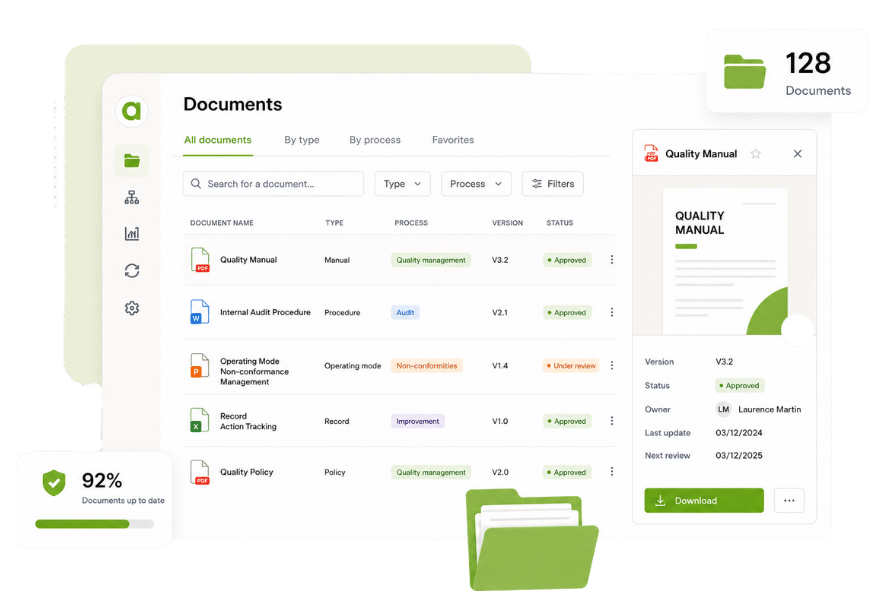
Centralize, version control, and secure all your quality documents in a single tool featuring an automated approval workflow, full-text search, and access to the correct version by the right people.
Agilium enabled us to build and digitize our quality system and obtain our ISO 9001 certification in less than a year. The solution is particularly well-suited for small industrial businesses thanks to its ease of use and comprehensive coverage of quality processes. We now manage our audits, risks, nonconformities, action plans, and documents from a single platform. Our teams quickly adopted the tool, and we now have a clear and structured view of our QMS. It’s a real asset in supporting our growth.
Thierry Casanova
Quality Manager
Premium Energy
Energy-Efficient Renovation
The activity history with export and filter options is really handy. I give monthly presentations to my management team on what’s going on, and this lets me put together a report in two minutes: I filter what I want to show, export it, and I’m done. The favorite documents for my teams, the FAQ right in the tool… these are the little things that really make a difference every day. Generally speaking, people find their way around it. We set up the folders together, so they’re pretty comfortable with it. And what we’ve always appreciated about Agilium is how responsive they are: when I have a question, I get a clear answer within half a day. For an SME like ours, that’s really helpful.
Justine SAINT MARTIN
Quality and QSE Manager
UPEC
Higher Education
Agilium is, overall, a fairly practical solution that allows us to work flexibly on our problems and challenges. We see the solution evolving over time. In addition, follow-up by our contacts at the service provider is smooth and consistent, which is a major plus. We appreciate the ability to work on action plans, audits, and processes. We also appreciate the flexibility offered in terms of the software interface layout.
Alexandre Leroy
Internal and Organizational Auditor
Losange
Manufacturers
EDM at Its Best: User-friendly system, layout, tracking of reading information…
Frédéric Rivet
QMS Manager
Lustucru Frais
Food production
We had a great experience with a sales representative who was very attentive to our needs. The email-based workflow system with read receipts is excellent.
Aline FAVIER
Quality Engineer
Medissimo
App for Pharmacists
So far, the setup is going very smoothly, and the configuration is very simple. The main advantages we see are its ease of use and configuration.
Emmanuel Leclerc
Director of Internal Operations & Quality Manager
Frequently Asked Questions
Everything You Want to Know About Agilium
A platform designed to centralize your operations, automate your processes, and engage your teams in a more streamlined quality initiative.
Can each process owner see only their own documents and metrics?
Yes, in Agilium, each process owner can have a view limited to their own documents and metrics, with read and edit permissions.
For other processes and documents, he has read-only access.
The quality manager, for his part, retains overall control of the application: managing access, viewing and editing content, and assigning roles across all processes and documents.
ELECTRONIC DOCUMENT MANAGEMENT, INDICATORS
When you archive a document, does it disappear completely?
When a document is archived, it is no longer visible to users but remains accessible to administrators. It can be restored if necessary.
ELECTRONIC DOCUMENT MANAGEMENT
Are there automatic reminders if a document isn't approved by the deadline?
Yes, you can set time limits and generate automatic reminders—for example, after 10 days and then daily—until the request is approved.
ELECTRONIC DOCUMENT MANAGEMENT
We're currently using SharePoint, but it has its limitations. How does your document management system compare to SharePoint?
SharePoint is a general-purpose platform and is not optimized for quality: it lacks native support for lifecycle management, quality validations, and action plans. Agilium is specifically designed for document and quality management, which simplifies configuration, use, and auditability.
ELECTRONIC DOCUMENT MANAGEMENT
We want to be able to manage operating procedures—with a drafters, team approval, and then signatures. Is it possible to record this and have a simple summary to present during an audit?
Yes, that’s exactly how Agilium’s document workflows work: you define the steps (drafting, validation, approval, distribution). The software tracks all signatures and generates a history that can be used directly for your audits.
ELECTRONIC DOCUMENT MANAGEMENT
Can we import our existing documents into Agilium?
There are two possible scenarios: either we import all your existing documents into Agilium (including the metadata), or you take advantage of the project to clean things up and integrate them gradually. Both approaches are viable; it’s an organizational decision.
ELECTRONIC DOCUMENT MANAGEMENT
Can there be more than one approver?
Yes, Agilium allows you to designate multiple contributors and approvers in document workflows.
ELECTRONIC DOCUMENT MANAGEMENT
Does Agilium allow you to digitize and automate processes other than quality?
Yes, Agilium offers a “Records” module, which is a no-code builder. It allows you to quickly design workflows without any programming. Common use cases include: incident reporting, equipment inspections, etc.
ELECTRONIC DOCUMENT MANAGEMENT
Is it possible to digitize manufacturing files for the workshops?
The solution enables the digitization of production files on the shop floor by consolidating all quality documents and forms in one place.
ELECTRONIC DOCUMENT MANAGEMENT
Can you customize headers, footers, and Word templates?
Word templates (headers, footers, styles) can be configured directly in Agilium to ensure consistency across your documents.
ELECTRONIC DOCUMENT MANAGEMENT
What types of files can be shared?
Agilium supports all standard file types—Word, Excel, PDF, and images—which allows for great flexibility in document management.
ELECTRONIC DOCUMENT MANAGEMENT
Can we customize the filing system to suit our needs?
The filing system is fully customizable and scalable to adapt to your organizational needs and future changes.
ELECTRONIC DOCUMENT MANAGEMENT
Can we search for documents by job description or by process?
You can easily search the database using criteria such as job descriptions, processes, or keywords, with advanced filters.
ELECTRONIC DOCUMENT MANAGEMENT
Is there a mandatory validity period for the documents?
Yes, in the quality directory (only), it is essential to set an expiration date for each document, with automatic alerts sent before the expiration date to schedule the review.
ELECTRONIC DOCUMENT MANAGEMENT
Is it possible to get a general overview showing all documents and their revision dates?
A dashboard is available to track all documents and their revision dates, and to plan for any necessary updates.
ELECTRONIC DOCUMENT MANAGEMENT
Is it possible to find all documents by job title, such as "financial manager"?
Agilium allows you to find documents by position, process, or department, using a multi-criteria search engine based on customizable metadata.
ELECTRONIC DOCUMENT MANAGEMENT
Can we have multiple classification schemes by site or country?
Agilium allows you to configure multiple classification schemes tailored to your sites, subsidiaries, or countries, while maintaining consistency in the overall document structure.
ELECTRONIC DOCUMENT MANAGEMENT
Is document coding automated and customizable?
Codification in Agilium is automatic, customizable to fit your existing structure, and prevents duplicates. This ensures that every document reference created is unique.
ELECTRONIC DOCUMENT MANAGEMENT
Do we receive a notification when a document expires or is revised?
Yes. Agilium sends an automatic notification before a document expires and whenever a new revision is made. You set the alert intervals; Agilium takes care of the rest.
ELECTRONIC DOCUMENT MANAGEMENT
How do you manage access rights by profile/role?
Confidentiality is ensured through granular access control: for each folder or document, you can specify who is authorized to view, edit, or contribute to it.
ELECTRONIC DOCUMENT MANAGEMENT
Ready to transform your quality approach ?
Join the 250 organizations that manage their quality with Agilium. Our experts based in Grenoble will guide you every step of the way—with no offshore staff and no surprises.